QR Code RPO Label Decoder App
With the app, you can scan the vehicle QR code and instantly get decoded results. The app reads the QR data and shows the vehicle details with the 3-digit RPO codes and their descriptions.


Using the app is simple:
- Open Decode RPO on your phone.
- Scan the QR code or the Service Parts Identification label.
- View decoded RPO codes, descriptions, and vehicle information instantly.

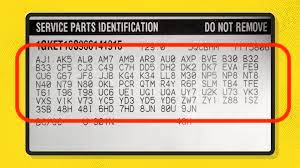
You can also use Decode RPO to read the Service Parts Identification label with printed text RPO codes. Just point your camera at the label, and the app will detect the codes and decode them automatically.
This is the fastest way to identify factory options, package contents, and paint information directly from your vehicle label.
QR RPO Decoder is available for any iPhone and Android.
What do RPO Codes Mean?
A Regular Production Option is a General Motors standard coding for vehicle configuration options Each RPO code is a combination of three alphanumeric characters (like Z71) that refers to a specific option or modification to the vehicle as built during production and can be used to identify specific vehicle options or modifications such as paint colors, engine types, interior options, wheel types, etc.
Where are RPO Codes Located?
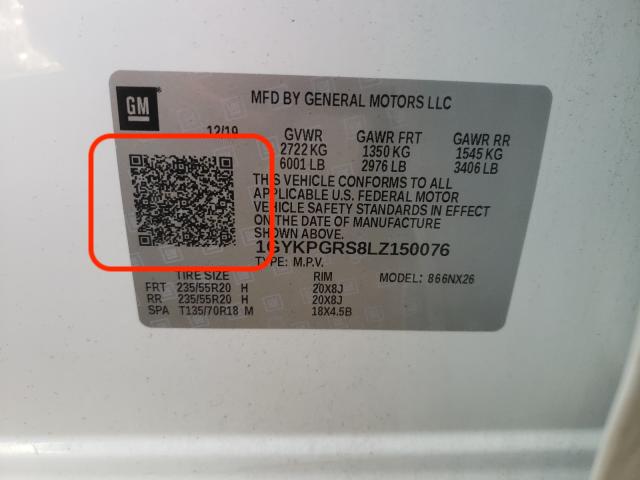
Beginning with the 2018 model year, a QR code was added to the Certification label on all Buick, Cadillac, Chevrolet and GMC models. The new QR code includes the Vehicle Identification Number (VIN), RPO codes and other information that identify the content of the vehicle. In previous model years, the Service Parts Identification (SPID) label, often located in the trunk or glovebox of a vehicle, included this information.
Where are RPO Codes Located before 2018?
RPO codes can be found on a placard labeled "Service Parts Identification" in the glove box, on the trunk floor or inside the driver's door panel.
- Bravada: in the glove box
- Cobalt: on the trunk floor
- Envoy: n the glove box
- Camaro: on the trunk floor
- Rainier: in the glove box
- Silverado/Sierra: in the glove box
Mopar VIN Equipment Decoder (Chrysler, Jeep, Dodge, Ram)
Decode the Equipment Listing by VIN for the MOPAR group (Chrysler, Jeep, Dodge, Ram).
Please provide your 17-character VIN to view and print your vehicle equipment sheet, which contains the standard and optional equipment installed when the vehicle was built.
Vehicles built before 1998 are not eligible for this functionality.
Works only for Dodge, Chrysler, Jeep, and Ram vehicles.
About the Mopar VIN Equipment Decoder
Our free Mopar VIN Equipment Decoder lets you quickly decode a vehicle number to access detailed vehicle information, factory-installed equipment, sales codes, option packages, and original build data for Chrysler, Jeep, Dodge, and Ram vehicles.
Enter a 17-character VIN, click Decode, and view available details such as:
- Factory equipment and sales code list
- Original options, equipment groups, and packages
- Model, body style, trim, engine, and transmission specifications
- Drivetrain, axle, suspension, towing, and performance equipment
- Interior, exterior, paint color, wheels, safety, and technology features
- Available build sheet and equipment listing information
Our decoder supports the standard 17-character code used from 1981 to the present for supported Chrysler, Jeep, Dodge, and Ram vehicles. The amount of available factory equipment data may vary depending on the model year, vehicle, market, and source records.
Where can I find my VIN?
If you are shopping for a new or used vehicle, the number is usually included in the vehicle listing, dealership page, auction listing, build sheet, equipment listing, or window sticker.
You can also find the number in several common locations on the driver’s side of the vehicle:
- At the base of the windshield
- On the driver-side door jamb or certification label
- Inside the glove box or center console on some models
- In the engine compartment
- On the vehicle registration, title, or insurance documents
Always enter the complete 17-character number and check each character carefully before decoding. Standard VINs do not contain the letters I, O, or Q.