


How to Read GM RPO Codes and Understand the Results
Overview
How to Read GM RPO Codes and Understand the Results explains how to read GM RPO codes and how DecoderPO uses detailed General Motors data to reveal turning technical three-character codes into useful vehicle information. The service is designed for Chevrolet, Buick, Cadillac, and GMC owners who need more than a basic make-and-model result.
DecoderPO is positioned as a precision-focused GM VIN decoder. Its main advantage is the ability to connect a vehicle identification number with RPO codes, factory-installed options, readable equipment descriptions, build information, and window-sticker data when that information is available.
Many generic VIN decoders stop after identifying the model year, manufacturer, model, body type, and a limited powertrain description. That information is useful, but it may not explain the exact configuration of the individual vehicle.
GM RPO codes provide the deeper layer. RPO means Regular Production Option, and GM uses these compact identifiers for engines, transmissions, axle ratios, suspension systems, paint colors, interior combinations, packages, electronics, regional specifications, and other production details.
Why RPO decoding is more detailed
For a broader introduction, read GM RPO Code List: Engines, Transmissions, Colors, and Options. It explains how vehicle identification and option-code decoding work together.
Two vehicles with the same badge and trim name can still have different equipment. Standalone options, package combinations, production changes, regional requirements, and fleet configurations can all change the final build.
That is why DecoderPO focuses on vehicle-specific data rather than assumptions based on trim names. The goal is to show what the vehicle was associated with at the factory and translate the technical codes into language that owners can understand.
A detailed RPO result is useful before buying a used vehicle. It can help confirm towing equipment, performance packages, premium audio, driver-assistance systems, suspension options, interior features, and other equipment that may affect value.
Understanding and using the codes
To understand the raw identifiers, see GM QR Code RPO Decoder for Newer Chevrolet, Buick, Cadillac, and GMC. A readable definition is more useful than an unexplained three-character code.
RPO data is also helpful during repairs. Engine, transmission, axle, brake, suspension, cooling, emissions, and electrical options can affect which parts fit and which service procedure applies.
The decoded result should still be combined with the model year, production date, physical inspection, and existing part numbers. Factory option data is an important fitment signal, but it should not replace every other verification step.
Restoration projects benefit from the same information. The original codes can help separate factory equipment from later modifications and provide guidance for paint, interior trim, wheels, suspension, drivetrain, and period-correct accessories.
Build sheets and window stickers
Build-oriented research is covered in GM Paint Code by VIN and RPO Data. A build-sheet style result organizes many separate codes into a more understandable picture of the vehicle.
A GM build sheet and an RPO list are closely related, but they are not always the same document. An RPO list identifies production options, while a build sheet may present the full configuration in a more structured form.
A window sticker adds different information. Depending on coverage, it may include standard equipment, optional packages, original pricing, destination charges, fuel-economy data, colors, assembly details, and other information displayed when the vehicle was new.
For sticker-specific details and coverage limitations, review GM RPO Codes by VIN: Find Original Factory Options. Not every model year or VIN has an original window sticker available, so a lookup should not promise a document that the source data cannot provide.
Entering the VIN and finding labels
The best input is the full 17-character VIN copied from a reliable source. Common locations include the dashboard near the windshield, the driver-side certification label, registration documents, insurance records, and title paperwork.
Standard 17-character VINs do not use the letters I, O, or Q. This reduces confusion with the numbers 1 and 0, but users should still check every character because a single error can prevent a correct match.
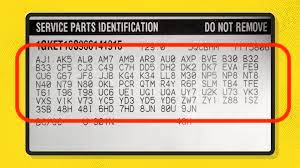
On many older GM vehicles, the Service Parts Identification label contains a printed list of RPO codes. Depending on the model, it may be found in the glove box, trunk, spare-wheel area, center console, door area, or another interior location.
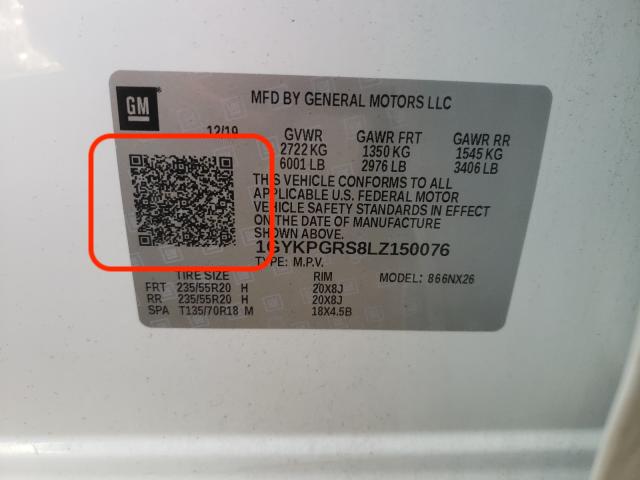
On many newer vehicles, a QR code on the certification label replaces the long printed option-code list. VIN-based decoding is useful when that label is inconvenient to scan, damaged, missing, or no longer readable.
Owners dealing with label problems can continue with Cadillac RPO Codes by VIN: Original Luxury Options. It describes alternative ways to research the original equipment.
Reviewing the result
After decoding, review the major categories first: engine, transmission, driveline, axle, suspension, brakes, towing, paint, interior trim, safety systems, and high-value packages. Production-control codes can be evaluated afterward.
DecoderPO is intended for detailed GM configuration research, not vehicle-history reporting. It does not replace checks for title status, accidents, ownership, liens, mileage, recalls, theft, or service history.
The most reliable picture comes from combining the VIN decode, RPO list, available window sticker, physical inspection, maintenance records, and official parts or service information when needed.
Decode your GM vehicle: Enter a Chevrolet, Buick, Cadillac, or GMC VIN on DecoderPO to check available RPO codes, factory options, build information, and window-sticker data.